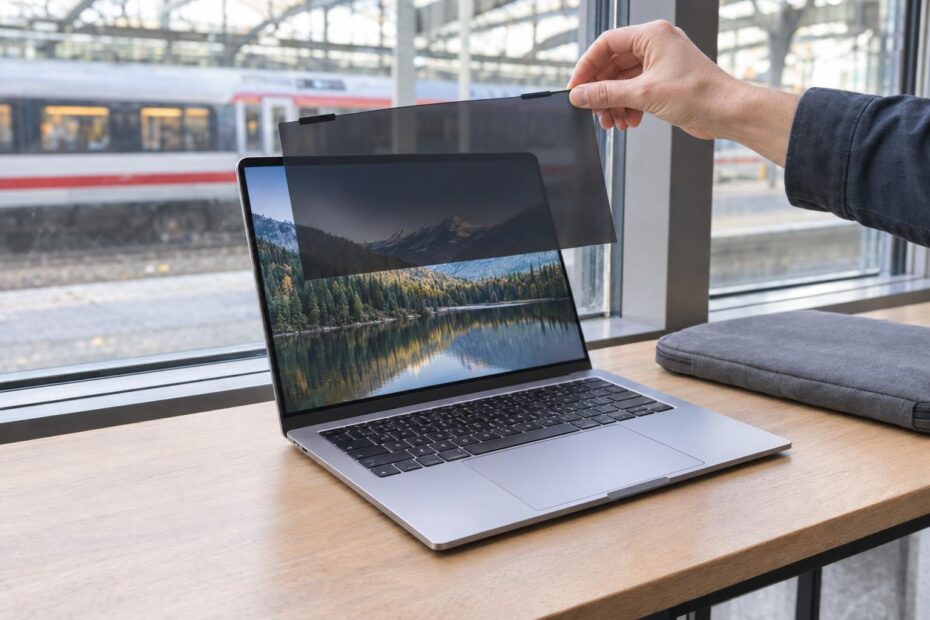
A privacy filter earns its place on a crowded train. Ten minutes later, in a meeting where a colleague needs to see your screen, that same filter can get in the way. If your workday regularly swings between those two situations, how the filter attaches matters just as much as how well it blocks side views.
The magnetic vs adhesive laptop privacy screen filter decision comes down to how often you want an unrestricted view. A magnetic filter is easy to snap on and remove, which suits commuters and MacBook users who move between public workspaces and meetings. A direct-adhesive filter makes more sense when you want privacy throughout the day and rarely need to change the setup. There is also a middle ground: adhesive tabs that stay on the bezel while the filter slides out.
Magnetic vs Adhesive Laptop Privacy Screen Filters at a Glance
| Everyday consideration | Magnetic attachment | Direct-adhesive attachment |
|---|---|---|
| Putting it on or taking it off | Designed for repeated removal without peeling adhesive | Best left in place between uses |
| Sharing your laptop screen | Remove the filter before turning the laptop toward a colleague | Share through a meeting app or external display if the filter stays on |
| Keeping track of the filter | Needs a safe place when removed | No loose panel to store during normal use |
| Closing the laptop | Check model-specific guidance; some filters must come off first | Check compatibility; a thin filter is not automatically safe to leave on |
| Best fit | Commuting, hybrid work, and frequent in-person collaboration | A dedicated workstation where privacy is needed most of the time |
Attachment style tells you how you will use the filter, not how much privacy it provides. Compare the stated viewing angle, brightness impact, finish, and fit of the actual products you are considering. A magnetic filter is not inherently easier to see through from the side, and an adhesive filter is not inherently darker.
Why Magnetic Privacy Screens Suit Commuters
Snap it on when your surroundings change
On a train, in an airport lounge, or at a shared table, the person beside you may have a clear view of your display. A magnetic laptop privacy screen lets you put a filter in place when you need it and remove it when you reach a private office. That is more convenient than peeling off and reapplying a direct-adhesive filter, which is not designed for the same daily routine.
Picture a consultant reviewing a draft proposal on the train. At the office, they remove the filter before showing a teammate a chart on the same laptop. Later, they snap it back on to review notes in a busy coworking area. The real benefit is choosing when to narrow the viewing angle without changing how they hold the laptop or where everyone sits.
There is one trade-off: a removed filter needs somewhere to go. A rigid sleeve or the case supplied by the manufacturer can help keep a thin panel from bending or rubbing against keys and chargers. If your laptop must be closed before boarding or leaving a meeting, factor in the time it takes to stow the filter safely.
Take it off for meetings where people share one screen
A privacy filter narrows the angle from which the display is easy to read. That works in a public space, but it can make a spreadsheet hard to see for someone sitting just off to the side. Removing the filter is often simpler than rotating the laptop back and forth during an in-person review.
The convenience does not apply to every meeting. If you share your screen through a video conferencing app, the other participants see the captured image, not the light coming through your physical filter. You can leave the filter on, provided you can still read your own display comfortably. When deciding what to buy, count the meetings where someone actually looks at your laptop, not just the number of meetings on your calendar.
What MacBook Users Should Check Before Buying
Match the filter to the exact model, not just the screen size
Check your MacBook model and the filter maker’s compatibility list. Two laptops sold under the same nominal screen size can have different bezel layouts or camera cutouts. A good fit should cover the intended display area without obstructing the camera or interfering with the way you position the screen. If you use a protective shell, check whether it affects the filter’s attachment or removal.
Also read how the magnetic mount works. Some products attach directly to compatible parts of the display assembly, while others require an adhesive-backed mounting piece. If your reason for choosing magnetic is to avoid sticking anything to the laptop, verify the mounting method before ordering. A detachable panel does not necessarily mean an adhesive-free installation.
Treat lid clearance as a separate buying decision
A filter can fit the open display without being suitable to leave in place when the lid is shut. Check the laptop maker’s guidance and the filter instructions for your exact MacBook. Do not assume compatibility with a particular model means the installed filter can stay on during transport, and never press the lid closed over a filter that creates resistance or a visible gap. If you cannot confirm that the filter can remain installed, remove it before closing the laptop.
This matters if your routine involves opening and shutting your MacBook several times a day. A magnetic panel that must come off each time can still be the right option, but only if you have a convenient place to store it. For a laptop that usually stays open on a stand, that same limitation may rarely matter.
When an Adhesive Privacy Filter Makes More Sense
Keep privacy in place at a dedicated workstation
A permanent desk is not necessarily a private desk. A laptop used at a reception counter or at the end of a bench in an open office may be visible to people walking past throughout the day. If the display is mainly for one person and the privacy requirement rarely changes, a direct-adhesive filter removes the daily decision about whether to put it on. It also eliminates the need to find space for a separate panel.
Think about where you do most of your work. If your laptop stays on a stand and you use an external monitor for presentations, leaving a filter on the laptop may pose little inconvenience. But the filter will not protect information shown on that external monitor. If the larger display is the one facing a walkway, address its position or privacy needs first.
Know what will stay attached
Listings can use adhesive to describe different setups. The distinction matters if you want to remove the filter without disturbing the hardware that holds it in place:
- Direct-adhesive filters attach using strips or another adhesive system intended to stay installed during ordinary use. Follow the product’s installation and removal instructions rather than assuming the adhesive can be reused.
- Adhesive slide tabs stay on the bezel, but the filter slides in and out. This is a practical compromise if you occasionally share the screen and do not mind seeing the tabs when the panel is off.
- Magnetic filters with adhesive mounts let you detach the panel while leaving a mounting piece behind. Check what needs to be stuck to the laptop and how it can be removed.
If you want a clean bezel when the filter is off, favor a compatible design that requires no attached hardware. If you want a set-and-forget installation, pay more attention to alignment, cleaning instructions, and the product’s removal guidance.
Check Everyday Usability Before You Commit
Test visibility in the lighting you actually work in
Privacy filters can make a screen look dimmer, and the effect varies by product and lighting. Small text that looks fine under office lights may be harder to read near a bright train window. A matte finish can help control reflections, but whether you like the resulting image is easier to judge in person than on a spec sheet. If accurate color matters for your work, check the display with the filter on and off before deciding to leave it installed full-time.
Test privacy from realistic positions, too. Ask a colleague what they can see from the next seat, the aisle, or behind your shoulder. Use a dummy document with the same text size and contrast as your usual work. A filter can reduce visibility from certain angles, but someone looking nearly straight at the screen may still be able to read it. For sensitive work, pair the filter with thoughtful seating and lock the screen whenever you step away.
Make the choice around your most frequent task
- Choose magnetic if you regularly switch between public work and meetings where people need to see your laptop display.
- Choose direct adhesive if your laptop stays at a dedicated desk, you need privacy most of the day, and you rarely share the physical screen.
- Choose adhesive tabs if you want a removable panel, can live with visible tabs, and only need to take the filter off occasionally.
- Check the fit before buying if you own a MacBook, use a laptop shell, or expect to close the lid with the filter installed.
The Bottom Line: Choose for the Moments You Switch
Magnetic is usually the more convenient choice for commuters and MacBook users who spend one part of the day protecting their screen and another part showing it to colleagues. Direct adhesive is a better fit for a dedicated desk where the view should stay restricted and the panel rarely comes off. Adhesive tabs split the difference by keeping the mount in place while letting you remove the filter.
Before buying, picture the two moments that matter most: opening your laptop in your usual workspace and closing it when it is time to leave. Then think about the last time you turned the screen toward someone else. Those details will tell you whether quick removal is worth carrying a separate panel or whether a filter that stays put will make your workday simpler.